
Workflow Builder vs React Flow — library vs production SDK
React Flow is an excellent canvas library. Workflow Builder extends it with the production layer your team would otherwise spend 14–25 weeks building. The question is where you want to start.

What React Flow gives you
React Flow is a library for building interactive node-based UIs in React - 35,000+ GitHub stars, actively maintained, strong community. It is the foundation Workflow Builder is built on.

Pan-and-zoom canvas as a React component
Configurable node and edge rendering with drag-to-connect
Selection, deletion, and copy-paste primitives
Full TypeScript and React ecosystem compatibility
React Flow gives you the canvas and leaves the application layer to you - by design. The question is how much of that layer you want to build.
What React Flow doesn't include – by design
React Flow handles the canvas. Everything that turns a canvas into a workflow editor your users can trust – that is yours to build. Here is what that means in practice.
Obstacle-avoiding edge routing
React Flow uses bezier curves by default. In dense graphs, edges cross through nodes and overlap each other. Implementing collision-free routing (libavoid-style) from scratch is a multi-week investment in computational geometry.
Auto-layout
When a user imports a workflow, the canvas doesn't organize itself. ELK and Dagre integrations exist, but the React Flow Developer Survey found nearly 50% of teams had to implement custom auto-layout - most described it as more work than expected.
Schema-driven node configuration
Each node type needs a configuration panel - a React component with form fields, validation rules, conditional logic, and styling. With 15 node types, this becomes a significant ongoing maintenance burden as schemas evolve.
Design system integration
React Flow's visual defaults - node appearance, edge style, handles, selection state - are a starting point, not a finished product. Matching the editor to your product's visual language requires styling every component to align with your brand.
Performance at scale
React Flow's maintainers have been candid: the library is not designed for very large-scale graphs. If your product serves enterprise customers with complex workflows, you'll spend meaningful time on virtualization, memoization, and render optimization.
Execution state visualization
Displaying per-node execution state - running, succeeded, failed, skipped - directly on the canvas requires a purpose-built visualization layer: state management, overlay rendering, and edge state propagation.
14–25 weeks
For a senior React developer to build these features to production quality.
That is a full quarter of engineering time before your workflow editor is ready for real users.
At $120/hr - $67,200 to $120,000 in developer cost.
* These numbers reflect typical estimates across projects we've delivered with our expert developers, even if you use LLM-assisted development.
The real cost comparison
React Flow is free - and that is worth saying clearly. The more complete picture is total cost, including the developer time required to build what React Flow intentionally leaves open.
| React Flow | Workflow Builder | |
|---|---|---|
| License | Free (MIT) | Open Source Community free & €6,990 one-time Enterprise |
| Edge routing | Build from scratch - 2-4 weeks | Included (libavoid) |
| Auto-layout | Build from scratch - 1-2 weeks | Included (ELK) |
| Node config panels | Build per type - 2-4 weeks | JSON Schema → UI, included |
| Design system | Build from scratch - 1-3 weeks | Full Design System included |
| Performance at scale | Optimize from scratch - 2-4 weeks + ongoing | Tested at 500+ nodes, included |
| Execution visualization | Build from scratch - 2-4 weeks | Flow Runner plugin, included |
| Total dev time | 14-25 weeks | 1-4 weeks to integrate |
| Dev cost at $120/hr | $67,200-$120,000 | Included in license |
When to use each
This is not a close call in most situations. The right choice depends on what you are building and how much of the editor layer you want to own.
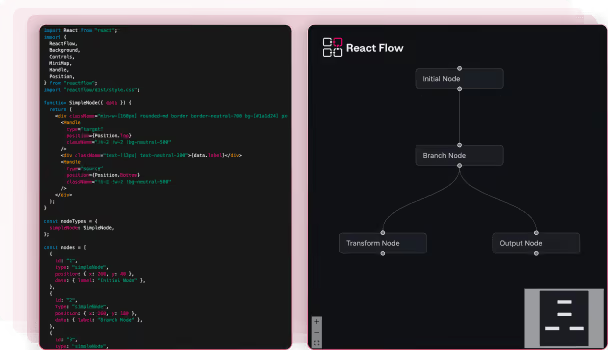
Use React Flow when
You need the raw canvas
You are building a custom node-based UI that is not a workflow editor: diagrams, mind maps, design tools, or interfaces with highly specific interaction models
Your team has already built the production abstraction layer on previous projects and is maintaining it
The editor is an internal prototype that never needs to look polished or scale to production traffic
You need a custom interaction model that an opinionated SDK would constrain
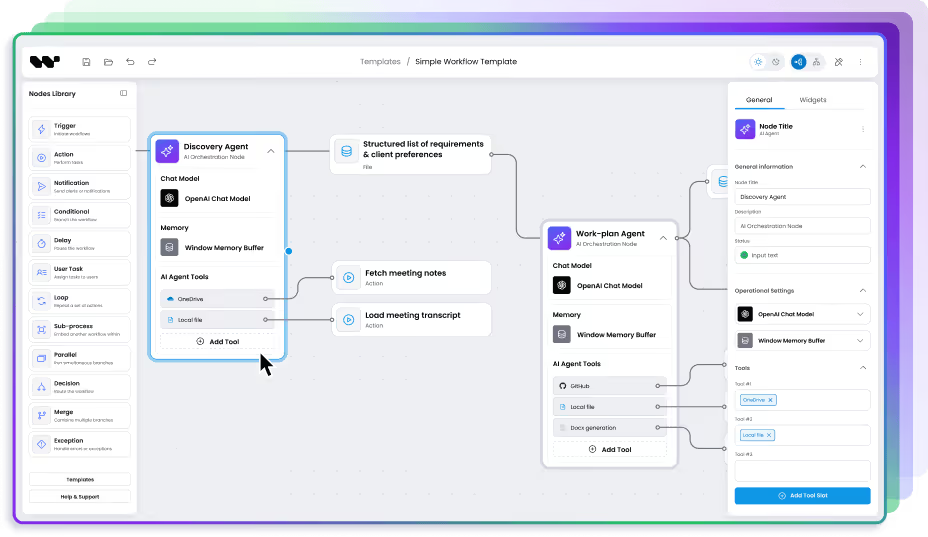
Use Workflow Builder when
You need it ready for users
You are embedding a workflow editor in a B2B SaaS product - one that needs to look like part of your product and handle real user workflows at scale
You are working against a real delivery timeline: a product roadmap commitment, an investor demo, a competitive release
Your team does not have prior canvas engineering experience - the hard problems are significantly less documented than the easy ones
The editor needs to match your product's design system without rebuilding every component from scratch
Workflow Builder is built on React Flow
Choosing Workflow Builder is not choosing against React Flow. It is choosing a production workflow editor layer built on top of it — the edge cases solved, the production patterns extracted, and the hard problems packaged into a composable SDK.
When you use Workflow Builder, React Flow still handles the canvas. You get the full React Flow ecosystem — its documentation, its community, its plugin library — plus the layer that handles what React Flow intentionally leaves open.

Your product
Your application, your users, your brand

Workflow Builder SDK
Edge routing · Auto-layout · Schema-driven UI · Design system · Flow Runner

React Flow (@xyflow/react)
Canvas · Nodes · Edges · Pan/zoom · Drag-to-connect
Trusted by engineering teams at


15+ years of diagramming expertise | 170+ commercial projects delivered
What teams say after evaluating React Flow

We searched the market, looked at React Flow, n8n, Make, Zapier - you stood out because you're self-hosted and highly customizable.
Workflow Builder gave us a complete, proven foundation - architecture, UX patterns, interaction design - all solved. Our team went straight to building what's unique about our product instead of reinventing the wheel.

FAQ
- Is Workflow Builder a replacement for React Flow?
No. Workflow Builder is built on React Flow. When you use Workflow Builder, React Flow still handles the canvas - nodes, edges, drag-to-connect, pan and zoom. Workflow Builder adds the production workflow editor layer on top: obstacle-avoiding edge routing, ELK auto-layout, schema-driven node configuration, design system, performance optimization at scale, and execution visualization.
- What does React Flow not include?
By design, React Flow does not include: obstacle-avoiding edge routing, ELK or Dagre auto-layout (integrations exist but are fragile), schema-driven node configuration panels, a design token system, performance optimization for enterprise-scale graphs, or execution state visualization. These are deliberate scope decisions. React Flow is a canvas library - everything above that layer is yours to build.
- How long does it take to build a production workflow editor with React Flow?
The basic canvas takes roughly a week. The production layer takes 14-25 weeks for a senior React developer. At $120/hr, that is $67,200-$120,000 before the editor is ready for production users.
- What is the total cost of React Flow vs Workflow Builder?
React Flow is free (MIT). Building the production layer costs 14-25 weeks of senior developer time. Workflow Builder Community Edition is open-source under Apache 2.0. The Enterprise Edition is a one-time €6,990 license. Integration takes 1-4 weeks.
- Can I use Workflow Builder with Angular, Vue, or vanilla JavaScript?
Yes. Workflow Builder ships as React components and as a web component that works in Angular, Vue, and vanilla JavaScript applications.
- What is the difference between Workflow Builder and React Flow?
React Flow is a library: it gives you a canvas and the primitives to render nodes and edges. Workflow Builder is a production-ready SDK built on top of React Flow. It adds edge routing, auto-layout, schema-driven UI, design system, validation, and execution visualization.